Author: whizadmin

  • From Reality to Virtual: Designing Your Avatar with Ready Player Go

    From Reality to Virtual: Designing Your Avatar with Ready Player Go

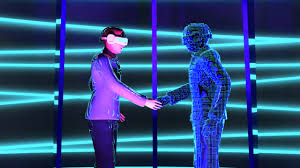
    With virtual reality and immersive online communities, avatar formation is an inevitable part of expressing oneself in digital media. It can be used for playing games, social networking, or business purposes; making a personalized avatar makes the process fun as well as significant. Ready Player Go is one of those applications that turn this process easy and interactive, by which users can build their customized 3D avatars in just a few minutes.

    In this blog, we are going to take you through how you can create your own avatar with Ready Player Go. It takes your virtual self and allows it to become a dynamic digital persona.

     Step-by-Step to Create an Avatar

     1. Sign Up or Log In

    Access Ready Player Go. You can download their website or app on any preferred device. Then, sign up as a new user by inputting your email or log in with your social login option, if you already have an account.

     2. Base Model Selection

    When you enter the world, you are prompted to select a base model. There are a variety of basic avatar templates available in Ready Player Go, including different body types, skin tones, and gender choices. This will be the base model for your actual personalized avatar.

     3. Customize Facial Features

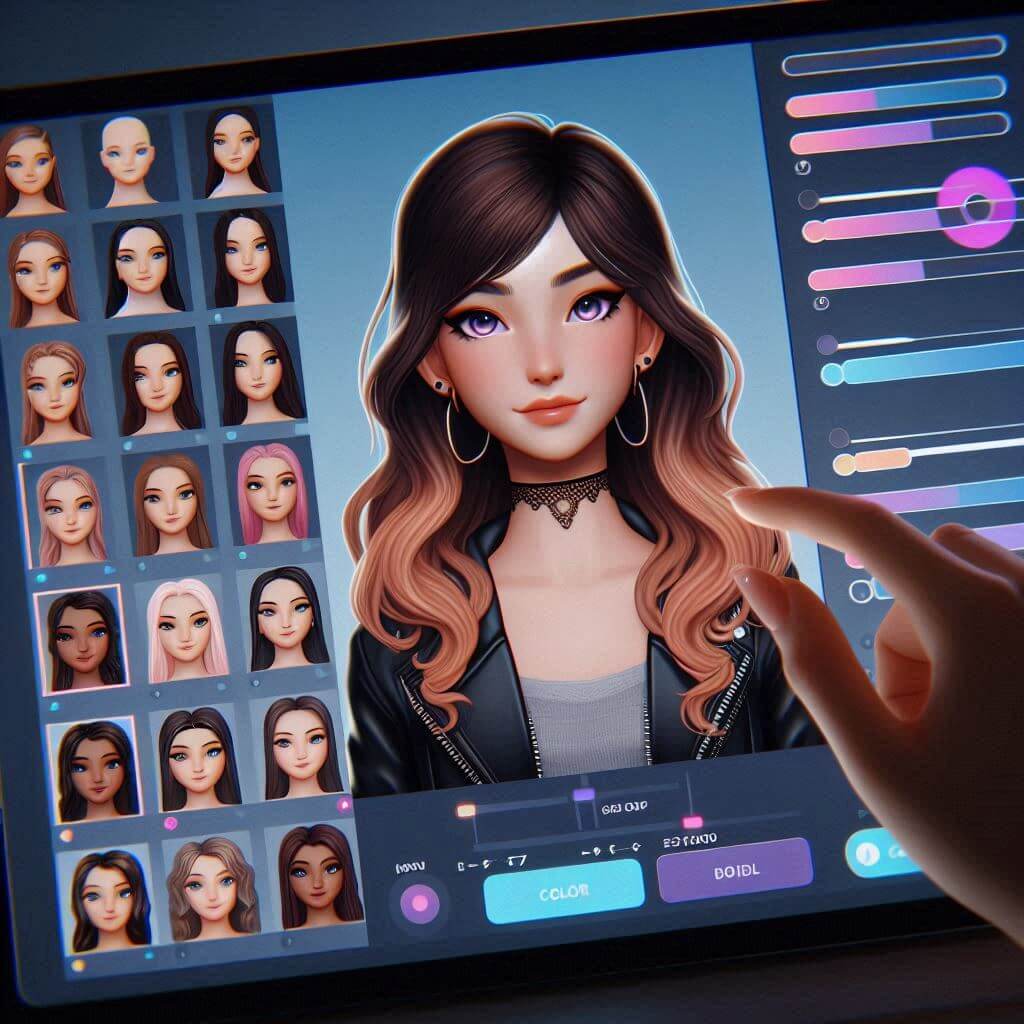
    All things being equal, refine the details. Time to get specific. Ready Player Go lets you refine your avatar’s facial features. You can adjust:

    * Face shape: Round, Square, Heart Shaped

    * Eyes: Choose the shape and size, even the color.

    * Nose and mouth: Tweak nose width, mouth size. so on to mirror the real you or the you you’d like to be.

    With the same app, you’ll also enjoy a photo scan feature: you upload your selfie, and Ready Player Go will generate a 3D face based on your own!

     4. Hair and Hairstyles

    Hair can be one of the more highly customized attributes when creating avatars. Ready Player Go offers a full selection of hairstyles, from flowing waves to short curls and even the choice of hair color. You can even add highlights for an added touch of flair.

     5. Outfit and Accessories

    Another place you’re allowed some leeway is in clothing. The website has an arsenal of dressing for casual wear, professional wear, even fantasy wings. You can mix and match different clothing and shoes, add glasses, hats, or jewelry as needed. Many outfits can be customized by changing colors or patterns.

     6. Pose and Expressions

    You can set a default pose or expression on the avatar to add to its personality. There are libraries of poses, such as confidence, joy, and maybe even relaxation. Some avatars can be animated with simple gestures, like waving or smiling, to enhance their interactions in virtual environments.

     7. Add Finishing Touches

    Once you have customized the look of your avatar you can add final detail things such as tattoos, makeup or scars if you want. These extra little details will only make your avatar even just a little bit more unique and characteristic of yourself.

     8. Export or Use Your Avatar

    Export or use in VR spaces: When you are contented with your avatar, you can export or use it in other virtual spaces. The Ready Player Go has export options compatible with environments, games, and social platforms. You can even download your avatar in different file formats or directly connect it to VRChat or AltspaceVR.

     Tips for an Improved Avatar Creation Experience

    – Invest time: How much effort you put in will make it seem like an extension of you; the more you invest, the closer it will be to what you want it to be.

    – Experiment: Try on lots of different looks or styles until you’re happy – it’s not like it’s set in stone.

    – Photo scan: Some realistic looks can be had through photo scan, and maybe even a 3D model of your face.

    – Fashion forecast: Keep on the lookout for seasonal updates and other new accessories added by Ready Player Go so that you can stay updated on latest trends.

     Conclusion

    Creating an avatar with Ready Player Go is the most seamless, enjoyable experience at hand as you explore your identity in the digital space. Whether you want to use it for gaming, virtual meetings, or perhaps social media, that avatar represents who you are or even can be. Follow these steps, and you’ll have your very own virtual avatar ready to go in no time!

    Let the digital journey begin!

  • POWTOON

    POWTOON

    Introduction:

    Preserving ideas, sharing knowledge, and holding audiences captivated in today’s visually-driven world is more about presentations. It is a daunting task to make good presentations attractive and interactive. The table now turns for Powtoon, which is an innovative platform with revolutionary capabilities: assisting users in making awesome, animated videos and presentations with ease. In this blog post, we’ll dig into what makes it great, how great it is, and what powers it all: the features, benefits, and applications of Powtoon to make you a presentation rockstar!

    What is Powtoon?

    Powtoon is a cloud-based service which enables the creation of:

    1. Animated videos
    2. Interactive presentations
    3. Explainer videos
    4. Infographics
    5. Social media content

    Key Features

    1. Drag-and-drop interface. Easy and simple to use. No design experience required.
    2. Templates and characters. Customizable templates and characters available
    3. Animations and effects. Professional-quality animations and effects available
    4. Voiceover and music. Adds audio for engagement
    5. Collaboration tools. Real time collaboration and commenting

    Benefits

    1. Increased Engagement. Interactive visuals capture audience attention
    2. More Retention- Animated content for learning and retention
    3. Time Saver-Create slides in minimal design time
    4. Low cost application-suitable for businesses as well as educators
    5. Scalable: Ideal for application by industries as well as users

    Applied fields

    1. Education- Interactive lessons, tutorials, and course materials
    2. Marketing- Explainer videos, product demos, social media, etc
    3. Training at Corporates- Onboarding, compliance training, presenting, etc
    4. Sales- Pitch decks, product showcases, customer engagement, etc
    5. Non-Pro for Revenue, Advocacy, and Awareness

    Bonus Tips and Tricks

    1. Keep it Simple: Use key messages, focus on key visuals
    2. Storytelling: Engage audiences with narratives
    3. Explore Styles: Try different templates, characters
    4. Add Interactivity: Include quizzes, polls, and games
    5. Optimize for Mobile: Ensure seamless playback

    Pricing and Plans

    1. Free: Basic features, limited exports
    2. Pro: Advanced features, unlimited exports
    3. Business: Custom branding, priority support
    4. Education Plan: Offering a discount to educational organizations

    Conclusion:

    Powtoon is revolutionizing the landscape of presentations – intuitive, engaging, and animated content with Powtoon. With thousands of features, benefits, and applications, Powtoon is an indispensable tool for educators, marketers, businesses, and non-profits. Unlock your potential in presentations with Powtoon now!

    Other Resources:

    1. Powtoon Website: https://www.powtoon.com/
    2. Powtoon Tutorials: https://whizrobo.com/courses/powtoon/
  • The Metaverse: A Sneak Peek of the Future of Digital Reality

    The Metaverse: A Sneak Peek of the Future of Digital Reality

    The metaverse concept has moved from science fiction into reality, changing the way people experience the internet and each other. So what is the metaverse, and why the excitement and attention by tech companies, innovators, and futurists? Let’s dive in for a journey through this next frontier of human interaction and digital experience.

     What is the Metaverse?

    Definitionally, the metaverse is a collective virtual space. It’s the merging of augmented reality (AR), virtual reality (VR), or even the internet, creating an immersive experience. Just think about it like some kind of huge connected virtual universe where one is able to communicate with the associated digital environments, objects, and even people, real time. While the internet of today is strictly limited to 2D screens, the metaverse bridges the physical to the digital, making its users feel present within the shared virtual space.

    Though the term “metaverse” first emerged several decades ago-in Neal Stephenson’s 1992 sci-fi novel *Snow Crash*-it finally starts getting closer to a realisation with the recent advancement of VR, AR, and blockchain technologies.

     Why Is the Metaverse Important?

    Metaverse is going to revolutionize the biggest industries involved in various sectors, right from gaming and entertainment to education and business. It opens endless opportunities for social interaction, commerce, and even working space. Imagine attending a concert with friends around the world all from your home or collaborating on a digital workspace where distance no longer matters.

    Some of the most compelling reasons why the metaverse is becoming so game-changing include:

    1. **Immersive Social Experiences**:Social experiences in the metaverse are essentially more immersive than just some text or video-based chatting. Users engage and interact as avatars in 3D spaces that provide presence and a shared experience much more akin to real-world interactions.

    2. **New Economic Models** New economies are emerging through blockchain technology feeding the metaverse. Virtual real-estate, NFT (non-fungible tokens), and digital goods allow users to buy, sell, and trade within virtual worlds. Entire business models and marketplaces are now starting to be developed within these ecosystems and are now earning real income from virtual assets.

    3. **Evolution of Work and Learning**: Remote working and virtual education have already been growing at an exponential rate. The metaverse will take this to a whole new level where virtual meeting rooms, conferences, even classrooms would mirror the dynamics of the actual interaction, making remote collaboration effective and engaging.

    4. **Gaming and Entertainment**: No doubt, gaming is one of the most frontline entry points to the metaverse. In fact, platforms like Roblox, Fortnite, and VRChat are already hinting at what experiences in the metaverse might be for their users. Users can socialize, create, and participate in these virtual worlds in real-time.

    Major Players Role in Creating the Metaverse

    Several technology companies are in a frenzied race to build their versions of the metaverse. Even Facebook has rebranded itself to “Meta” and has been very busy developing infrastructure for a metaverse that combines AR and VR with social media. Other companies such as Microsoft, Google, and Epic Games are all actively working on platforms that will shape this digital future.

    A metaverse is not one but many connected worlds, platforms, and ecosystems: The interoperability of such diversely constructed metaverse environments will be the success criterion-the facile transfer of users between worlds with the intact preservation of their digital identities and assets.

     Challenges and Ethical Considerations

    The metaverse, although exciting, has challenges and issues with ethics. Issues like privacy, security, and the digital divide may worsen if not addressed accordingly. In the new world, who will govern the metaverse? How will digital rights be managed? How can one ensure equal access without monopolies in this new world?

    And, as the metaverse further immerses itself into life, users may end up spending too much time in virtual space and thus have psychological and social impacts. The balance between virtual immersion and real responsibilities will, therefore, be significant considerations.

     Looking Ahead

    But at this point, still in its early stages, the trajectory for further development suggests that the metaverse will increasingly be an important part of our digital future. As VR and AR technology improves and more companies step up to build out the infrastructure, we can only imagine what other practical and interesting applications the metaverse will have in our everyday lives.

    In short, the metaverse is not just the next version of the internet; it’s a paradigm shift in how we engage with technology and each other. As it evolves, it promises to unlock new possibilities for creativity, connection, and commerce—heralding the dawn of a new digital age.

     Conclusion

    The metaverse is no longer pipe dream. And it has all begun to happen and changed the way we work or play, or socialize, for that matter. Whether it’s the new economy to be born out of social gathering, workplaces, or anything else, the metaverse represents the next step in the digital evolution. The only question is: are you ready to take the leap into it?

  • Breaking Boundaries: How AR and VR are Redefining Our World

    Breaking Boundaries: How AR and VR are Redefining Our World

    Apart from anything else, Augmented Reality (AR) and Virtual Reality (VR) are at the cutting edge of technological revolution. They are, in a sense, reinventing the way we interact with the digital and real worlds. Until recently, AR and VR belonged to science fiction; nevertheless, they are now disrupting industries as divergent as gaming, education, healthcare, and business. These technologies can offer rich alternative experiences that blur the difference between the real and the virtual, thereby paving the way for new avenues of creativity, communication, and interaction.

    Here, we discuss the differences between AR and VR, their current applications, and their potential to revolutionize the future.

    Understanding AR and VR: What’s the Difference?
    AR and VR often get talked about like they are the same thing. They are related, but in fact, they’re different technologies with different applications.

    Augmented Reality
    AR adds a digital layer of information—a picture, a sound or even other sensory inputs—to a real environment. That is to say, as opposed to the virtual world approach where a user is put into an entirely virtual world, AR brings together both the real and the digital, hence adding layers of interaction to surroundings. Access to AR can be accessed through a smartphone, tablet, or even wearables such as smart glasses.

    Key Characteristics of AR:

    Interactive Layering: Digital aspects, including 3D models, text, and images, are layered over the real world.
    Real-Time Interaction: People interact with digital content in real time but are always linked to their real-world environment.
    Easy Accessibility: AR is accessible using most mobile devices and has reached a wide penetration without demanding specific hardware.

    Most Common Examples of AR:

    Pokemon Go: The most well-known mainstream application of AR is its application in capturing real-life creatures using pictures in a game.
    Google Lens: Through the power of AR, it can do lots of things such as identifying objects, translating texts, and providing information about a physical item, given the right smartphone.
    IKEA Place: This app lets you try to see how furniture looks and fits in your place using augmented reality.
    Virtual Reality (VR)
    In VR, the user experiences a totally immersive experience within a completely digital environment because it cuts out the connection of a user with the physical world. The user is taken to a 3D virtual space with the aid of VR headsets in order to interact with digital objects, explore simulated worlds, or participate in virtual activities.

    Key Features of VR:

    The fully immersive experience. What VR does, thereby replacing completely the real world, is to transfer users to a totally digital environment, thus giving them the feeling of presence.
    Full Interactivity: They can interact with the virtual world and communicate using controllers or by hand-tracking capabilities.
    Hardware Requirement: In order to make use of VR, especially this type of technology, one would need the head-mounted display such as Oculus Rift, and powerful computers or gaming consoles.

    Popular Examples of VR:

    Oculus Quest 2: one of the most popular, giving users the ability to play highly immersive games, attend events in another world, or explore new, simulated environments.
    A game of VR, Beat Saber, would use the combination of music and movement with users cutting through blocks in a rhythmic style to the beat of a song.
    Google Earth VR: It is a virtual reality application where you can fly around the world and see cities and landscapes in bird’s eye view.
    Present Applications of AR and VR
    While still in the early stages of development, AR and VR have already been applied in many practical ways in various industries. Here are a few examples of the most exciting current uses of AR and VR:

    1. Gaming and Entertainment
    Gaming is probably the most extensive area where AR and VR have reached great level of penetration. VR brings users into totally virtual worlds, whereas AR injects additional levels of interactivity across physical space. Both Minecraft Earth and Fortnite are already playing with the fusion of virtual elements with reality, while VR gaming platforms are offering experiences that are fully immersive.

    This technology is already in the entertainment sector, which produces virtual concerts, 3D movies, and all other experiential events beyond traditional media. For instance, virtual concerts allow fans from anywhere on earth to “attend” live events and introduce a new dimension to music and performance.

    2. Healthcare and Medical Training
    Perhaps, one of the areas where AR and VR seem to make the maximum impact is in healthcare, particularly regarding training, surgery, or patient care. For instance, using VR simulation, medical students and professionals can perform intricate procedures minus the usual risk and hence better their skills without having a real-life practice.

    On the contrary, AR is applied in live surgery situations whereby doctors overlay models of organs and tissues onto the human body, hence improving the accuracy of the procedures involved. Moreover, AR is used in visualizing patient data to aid rehabilitation by creating interesting, interactive environments for physical therapy.

    3. Education and Training
    The largest beneficiary of AR and VR has been the education sector. One can see ancient historical sites, distant planets, or the very bottom of the ocean through virtual reality classrooms in an experience unmatched by the usual textbook.

    Similarly, AR may be used in bringing subjects to life by overlaying digital content on textbooks or even on the physical environment. The actual impact is pretty interactive and interesting learning. Immersive learning quite often helps in getting information retained in the student’s minds, creativity, and all that.

    4. Retail and E-commerce
    AR is change-making, since it closes the gap for us in terms of how we are shopping by changing how people experience both online and in-store stuff. With an app like AR, customers can view how clothes fit, what makeup will look like on their face, or how furniture will look in the house. It hence reduces returns and enables buyers to make better decisions.

    Although not widely implemented in e-commerce applications, VR is being researched currently for virtual shopping, in which customers may stroll through digital storefronts and interact with products before finalizing purchases from the comfort of their homes.

    The other application of AR, however, is the remote assistance. For example, with AR glasses, technicians may be able to overlay instructions or diagrams over a piece of equipment and a remote expert can guide them in real time for some of the more difficult repairs.

    The Future of AR and VR: What’s Next?
    Augmented reality and virtual reality have pretty good futures, with further growth in the next few years. Because the hardware continues to become cheaper and more powerful, these technologies probably will become part of everyday life. Now, just a few major trends to look for:

    1. AR Glasses: AR glasses also may replace smartphones as our principal interface with digital information. Apple, Google, and Facebook are already sinking serious money into lightweight, stylish AR glasses able to display e-mail notifications, maps, and all other forms of digital content right in front of our eyes.
    2. More Immersive VR Experiences: Next, with new advancements in VR hardware, experiences will be more immersed, with better graphics, haptic feedback, and seamless interactivity. Full-body haptic suits and advanced motion tracking can make VR even more realistic and engaging.
    3. 5G and Cloud VR/AR: With the launch of 5G networks, it will really start to accelerate AR and VR in a very responsive way. 5G will power the cloud-based AR and VR, where the computing power for that experience is handled by remote servers rather than expensive hardware.
    4. Cross-Platform Interoperability: Their full potential is realized only if the integration between the platforms and devices provides seamless performance. In the future, users should be able to move seamlessly between AR and VR environments, carrying their digital assets, avatars, and data from one platform without interruption.
      Conclusion
      Augmented and virtual reality are starting to change how we see the world around us, promising great new opportunities in various industries-beyond gaming, education, healthcare, and retail. Unlocking possibilities that were previously reserved for science fiction, such as having virtual dreams and computers understanding our voices, these technologies have made such magic a reality. Moreover, with technology growing, the lines between the physical and digital worlds will continue to blur, creating richer and more interactive experiences for everyone.
  • Introduction to Arduino

    Introduction to Arduino

    Speaking of electronics and robotics, Arduino is probably among the most heard names. This small and powerful microcontroller has changed the way people make do-it-yourself projects, prototype something, or even invent some new things. In this blog, we delve deep into the world of Arduino as we explain what it is, a brief history of it, the features, and the applications of Arduino.

    What is Arduino?

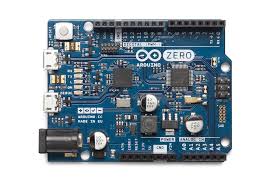
    Arduino represents an open-source electronics platform with easy-to-use hardware and software. It consists of the microcontroller board and the so-called software development environment, or IDE, which allows the user to write and upload code onto the board.

    History of Arduino:

    Arduino was born in 2003, the brainchild of Massimo Banzi and David Cuartielles from the Interaction Design Institute Ivrea in Italy. The intention, then and now, is to provide students and hobbyists with a low-cost, easy-to-use platform for exploring electronics.

    Features of Arduino:

    Shield Compatibility: Arduino boards are designed to be compatible with a wide range of shields, which are expansion boards that add new features and functionality.

    Microcontroller Board: Arduino boards come in various shapes and sizes, but they all feature a microcontroller chip that can read inputs, process data, and control outputs.

    Programming Language: Arduino uses a simplified version of C++ as its programming language, making it easy for beginners to learn and use.

    Analog and Digital Pins: Arduino boards have both analog and digital pins, allowing users to connect a wide range of sensors, actuators, and other devices.

    Applications of Arduino:

    1. Robotics: Arduino is widely used in robotics projects, from simple robotic arms to complex autonomous vehicles.
    2. Home Automation: Arduino can be used to automate home lighting, temperature control, and security systems.
    3. Wearables: Arduino is used in wearable technology, such as smart watches, fitness trackers, and smart clothing.
    4. Art and Design: Arduino is used in interactive art installations, lighting designs, and other creative projects.

    Getting Started with Arduino:

    1. Arduino Board Selection: Choose a board intended for your project, like the Arduino Uno or Arduino Nano.
    2. Arduino IDE Installation: Installation of the Arduino IDE involves downloading and installing the software onto a computer.
    3. The Basics: First, work through basic tutorials and projects to learn basic Arduino programming.
    4. Community Participation: Join the Arduino community via online forums, social media, and/or local meetups.

    Conclusion:

    Arduino has democratized access to electronics and microcontrollers, empowering makers, hobbyists, and professionals to bring their ideas to life. With its ease of use, flexibility, and vast community support, Arduino is an essential tool for anyone interested in exploring the world of electronics and robotics.

  • Unlocking the Power of ESP32: Revolutionizing Industrial Applications

    Unlocking the Power of ESP32: Revolutionizing Industrial Applications

    The ESP32 has emerged as a game changer in the rapidly improving landscape of IoT and Industrial Automation. This low-cost, powerful microcontroller seems to sweep the world for its unbeatable performance, versatility, and connectivity. In this blog, we’re going to see the importance of ESP32, its industrial application, and how it’s changing the way industries work.

    What is ESP32?

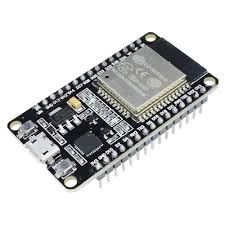
    ESP32 is a dual-core 32-bit microcontroller created by Espressif Systems. An impressive array of features includes, but is not limited to, 

    • High-speed processing, 
    • Wi-Fi and Bluetooth connectivity, 
    • Low power consumption
    • rich peripheral sets such as GPIO, ADC, DAC, support for a lot of programming languages

    Significance of ESP32:

    1. Low Cost: ESP32 is inexpensive and highly effective, thus proving to be a greater economical solution for industries that tend to avoid heavy expenditure.

    2. Connectivity: This features on-board Wi-Fi and Bluetooth capabilities, thus enabling wireless communication between devices with easy data exchange in real time, hence allowing remote monitoring.

    3. Flexibility: ESP32 supports multiple programming languages and development frameworks, meaning a developer can use his favorite tool and workflow.

    4. Scalability: The module-based architecture and full set of peripherals allow its application to range from simple sensors to complex systems.

    Industrial Applications of ESP32:

    1. Industrial Automation: The module finds its application in the manufacture of control systems, monitoring equipment, and automation solutions that improve productivity by reducing downtime.

    2. Smart Energy Management: The ability to connect and monitor energy usage opens up smart grid solutions for optimization in energy distribution and consumption.

    3. Environmental Monitoring: Sensors based on ESP32 monitor temperature, humidity, air quality, and other environmental factors to meet regulatory and safety requirements.

    4. Supply Chain Management: Trackers and monitors based on ESP32 could track the goods in real time, thus giving massive improvements to logistics, inventory management, and shipping.

    5. Medical Devices: The ESP32 is highly appropriate for wearable medical devices, patient monitoring systems, and telemedicine applications since it is low power and has connectivity.

    Conclusion:

    The ESP32 has indeed changed the industrial outlook in respect of performance, simultaneously offering connectivity and affordability. The versatility and scalability make it perfectly suitable for applications ranging from industrial automation to environmental monitoring. With industries further adopting IoT and digital transformation, the ESP32 will be at the very core in driving the future of innovation.

  • How to Master GitHub: A Guide for Students

    How to Master GitHub: A Guide for Students

    How to Master GitHub: A Guide for Students

    As a student stepping into the world of programming and software development, learning to use the right tools is essential. One of the most powerful tools you’ll encounter is GitHub. It’s not just for experienced developers; GitHub is a platform that can greatly enhance your learning experience and help you collaborate with others effectively. In this guide, I’ll walk you through the basics of GitHub, show you how to get started, and share tips on how to make the most of its features for your academic and personal projects.

    Why Should Students Use GitHub?

    Before diving into the details, let’s quickly cover why GitHub is an invaluable resource for students:

    1. Version Control: GitHub allows you to keep track of all changes made to your projects. This means you can experiment freely, knowing you can always revert to a previous version if something goes wrong.
    2. Collaboration: Working on group projects or collaborating on open-source projects becomes seamless with GitHub. It provides a central platform where you and your peers can contribute, review, and manage code collectively.
    3. Portfolio Building: As you work on various projects during your studies, GitHub becomes a digital portfolio showcasing your skills and code quality. Potential employers often look at GitHub profiles to gauge a candidate’s expertise and coding style.
    4. Learning from Others: GitHub is home to millions of open-source projects. You can learn a lot by exploring how experienced developers structure their code, handle complex problems, and manage projects.

    Getting Started with GitHub

    Step 1: Create Your GitHub Account

    1. Visit GitHub’s Website: Head over to GitHub.com and click on the “Sign up” button.
    2. Fill in Your Details: Enter your email address, choose a secure password, and pick a unique username. This username will become part of your personal GitHub URL (e.g., github.com/yourusername).
    3. Choose Your Plan: As a student, you can start with the free plan, which offers unlimited public and private repositories. GitHub also offers a special Student Developer Pack, which provides access to premium tools and features for free.
    4. Verify Your Email: You’ll receive a verification email to confirm your account. Click on the link to complete the setup.

    Step 2: Set Up Your First Repository

    A repository, or “repo,” is like a folder for your project. Here’s how to create one:

    1. Click on the “New” Button: Once logged in, click on the “+” icon in the top-right corner of the GitHub dashboard, then select “New repository.”
    2. Name Your Repository: Give your repository a meaningful name related to your project (e.g., MyFirstProject).
    3. Add a Description: This is optional, but it helps others understand the purpose of your project.
    4. Initialize with a README: Check the option to add a README file. This file is important because it describes your project and provides any necessary instructions.
    5. Choose a License: If you’re planning to share your project, choose an appropriate open-source license. This step is optional but recommended if you want others to use or contribute to your project.
    6. Create Repository: Click the “Create repository” button to finalize.

    Step 3: Cloning Your Repository to Your Local Machine

    To start working on your project locally, you need to clone the repository to your computer:

    1. Open Your Terminal: On Windows, you can use Git Bash or Command Prompt; on Mac, use the Terminal.
    2. Clone the Repository: Run the following command to clone your repository:
       git clone https://github.com/yourusername/MyFirstProject.git

    Replace yourusername and MyFirstProject with your GitHub username and repository name.

    Step 4: Making Changes and Pushing Them to GitHub

    1. Navigate to Your Project Folder: In the terminal, navigate to the folder where your repository was cloned:
       cd MyFirstProject
    1. Make Changes: Use your favorite code editor to make changes to the project files or create new ones.
    2. Add and Commit Changes: After making changes, you need to add them to the staging area and commit them:
       git add .
       git commit -m "Added new feature"
    1. Push Changes to GitHub: To upload your changes to GitHub, run:
       git push origin main

    Step 5: Working with Branches

    Branches are a powerful feature in GitHub that allow you to work on different versions of a project simultaneously. This is particularly useful for working on new features or bug fixes without affecting the main project.

    1. Create a New Branch: To create a new branch, run:
       git checkout -b new-feature
    1. Make Changes and Push: Make your changes, then add, commit, and push them to the new branch:
       git push origin new-feature
    1. Create a Pull Request: On GitHub, navigate to your repository. You will see a prompt to create a pull request for your new branch. Click on it, review your changes, and submit the pull request.
    2. Merge Changes: Once the pull request is reviewed and approved, you can merge the changes into the main branch.

    Tips for Students to Master GitHub

    1. Get Comfortable with the Command Line: While GitHub’s graphical interface is user-friendly, learning to use Git commands in the terminal can give you more control and efficiency.
    2. Contribute to Open Source: Start small by contributing to open-source projects. This is a great way to learn from real-world codebases, collaborate with experienced developers, and build a strong portfolio.
    3. Use GitHub Pages: You can host your personal website or project documentation using GitHub Pages. This is a free and easy way to showcase your work.
    4. Explore GitHub Actions: Automate workflows with GitHub Actions. You can use it for continuous integration, continuous deployment, or any other repetitive tasks.
    5. Follow Best Practices: Keep your commits small and descriptive. Regularly update your README file to reflect the current state of the project. Use issues and pull requests to keep track of tasks and changes.
    6. Join the GitHub Student Developer Pack: This pack offers access to a wide range of free tools and resources that can be incredibly helpful for your learning journey.

    Conclusion

    Mastering GitHub as a student is not only a valuable skill for your studies but also a great way to prepare for a career in tech. By leveraging GitHub’s powerful features, you can manage your projects more effectively, collaborate with peers, and build an impressive portfolio to showcase your skills to potential employers. So, don’t wait—create your GitHub account today and start exploring all the possibilities!

    Happy coding!

  • National Space Day – Honoring ISRO’s Space Exploration Achievements

    National Space Day – Honoring ISRO’s Space Exploration Achievements

  • Celebrating India’s Technical Triumphs on the 78th Independence Day

    Celebrating India’s Technical Triumphs on the 78th Independence Day

    As India marks its 78th Independence Day, it’s an opportune moment to reflect on the remarkable strides the country has made in the realm of technology. From pioneering space missions to groundbreaking advancements in artificial intelligence, India has firmly established itself as a global leader in innovation. Let’s take a look at some of the most significant technical achievements that have shaped India’s technological landscape.

    1. Space Exploration: The Dawn of a New Era

    India’s space exploration program has been a source of immense national pride and global admiration. The Indian Space Research Organisation (ISRO) has achieved several milestones:

    • Mars Orbiter Mission (Mangalyaan): Launched in 2013, Mangalyaan made India the first country to successfully reach Mars orbit on its maiden attempt. This mission demonstrated India’s growing capabilities in space exploration and marked a significant achievement in space technology.
    • Chandrayaan Missions: Chandrayaan-1, India’s first lunar mission, discovered water molecules on the Moon’s surface. Chandrayaan-2, despite landing issues, provided valuable data and insights, solidifying India’s presence in lunar exploration.

    2. Digital Revolution: India’s IT Superpower

    India’s IT sector has witnessed exponential growth, making it a global hub for software development and IT services. Key highlights include:

    • Digital India Initiative: Launched in 2015, this initiative aims to transform India into a digitally empowered society. It has led to the proliferation of digital services, including e-governance, digital payments, and online education.
    • Global IT Services Leadership: Indian IT companies like Tata Consultancy Services (TCS), Infosys, and Wipro have become global leaders, providing innovative solutions and services to clients worldwide.

    3. Artificial Intelligence and Startups: Innovation at Its Best

    India’s burgeoning startup ecosystem is driving innovation in various sectors, including artificial intelligence (AI):

    • AI Research and Development: Indian institutions and companies are making significant contributions to AI research. Organizations like the Indian Institute of Technology (IIT) and private firms are developing cutting-edge AI technologies, from natural language processing to computer vision.
    • Startup Ecosystem: India’s startup ecosystem is thriving, with a growing number of unicorns (startups valued at over $1 billion). Companies like Zomato, Paytm, and Byju’s are revolutionizing sectors such as food delivery, digital payments, and education.

    4. Green Technology: Pioneering Sustainable Solutions

    India is making strides in sustainable technology to address climate change and environmental challenges:

    • Renewable Energy: India is one of the world’s largest producers of solar energy. The country’s ambitious renewable energy targets and initiatives, such as the International Solar Alliance (ISA), are paving the way for a greener future.
    • Electric Vehicles (EVs): The Indian government’s push for EV adoption is fostering innovation in clean transportation. Companies are developing advanced EV technologies and infrastructure, contributing to a sustainable mobility ecosystem.

    5. Healthcare Innovations: Advancing Medical Technology

    India’s healthcare sector is evolving with technological advancements that improve accessibility and quality of care:

    • Telemedicine: The adoption of telemedicine solutions has expanded healthcare access to remote areas, allowing patients to receive medical consultations and services virtually.
    • Affordable Medical Devices: Indian companies are developing cost-effective medical devices and diagnostics, making healthcare more affordable and accessible to the masses.

    Conclusion

    As we celebrate India’s 78th Independence Day, it is clear that the nation’s technical achievements are a testament to its ingenuity, resilience, and vision. From space exploration to digital innovation, India continues to make significant contributions to global technology. These achievements not only highlight India’s growing technological prowess but also inspire future generations to push the boundaries of innovation.

  • Introduction to Scratch: A Fun Way to Learn Programming

    Introduction to Scratch: A Fun Way to Learn Programming

    Welcome to our Scratch programming blog! If you’ve ever wondered how video games are made, or if you just want to be able to make your own animations and stories, you’re in the right place. Scratch is a great computer programming language specifically designed for kids and beginners. Let’s take a closer look at how to get started coding with Scratch!

    What is Scratch?

    Scratch is a block-based programming language developed by the MIT Media Lab. You don’t have to type codes, just snap these colorful blocks into place to make programs. Much like building with LEGO bricks, but for programs! Scratch makes it easy and fun to learn to code, helping develop problem-solving skills and creativity.

    Getting Started with Scratch

    1. Create an Account:
    • Open Scratch.
    • Click “Join Scratch” to sign up for an account or log in if you already have one.
    1. Create a New Project:
    • Click “Create” to open the Scratch editor. This is where you are going to create your projects.
    1. Tour the Scratch Editor:
    • Stage: This is where your project comes alive. It’s like the “screen” where everything happens.
    • Sprites: These are the characters and objects you can control in your project.
    • Blocks Palette: Herein, lies the different programming blocks for use in your project.

    Creating Your First Scratch Project

    Let us get started by making a very simple first project.

    1. Choose a Sprite:
    • Click the “Choose a Sprite” button. You can choose a character or another object from the library that comes preloaded with Scratch, draw a sprite, or upload an image.
    1. Add a Backdrop:
    • Now you need to click the “Choose a Backdrop” button for choosing a space scene, forest, or any other type of background for your project, etc.
    1. Add Code to Your Sprite:
    • Tap your sprite to open its programming window.
    • Drag and drop blocks from the “Events” category into the workspace. For instance, use the “when green flag clicked” block for starting your code.
    • Get your sprite moving by using blocks from the “Motion” category. Use the block that says “move 10 steps” to make your sprite walk around the stage.
    1. Create a Simple Animation:
    • Use the “Looks” blocks to make your sprite say something or change costumes.
    • Combine blocks to create a sequence. For example, you could have your sprite say “Hello!” and then move across the screen.
    1. Test and Share Your Project:
    • Click the green flag to test your project. See how your sprite behaves, and make adjustments if needed.
      — When you are satisfied with your project, click “Share” to make it public so others can view and play with your creation.

    Tips for Beginners

    • Start Small: Start with simple projects, then move on to more complex ones as comfort in Scratch grows.
    • Experiment: Try out different blocks and what they do. Scratch is all about experimenting and really having a good time.
    • Ask for Help: Don’t be afraid to ask for help or to examine other Scratch projects. The community in Scratch is very nice and helpful.

    Join the Scratch Community

    Scratch isn’t all about coding; it’s about sharing and learning from one another, too. Join the Scratch community to share your projects, get feedback, and work with other young coders.

    Happy Scratching!